

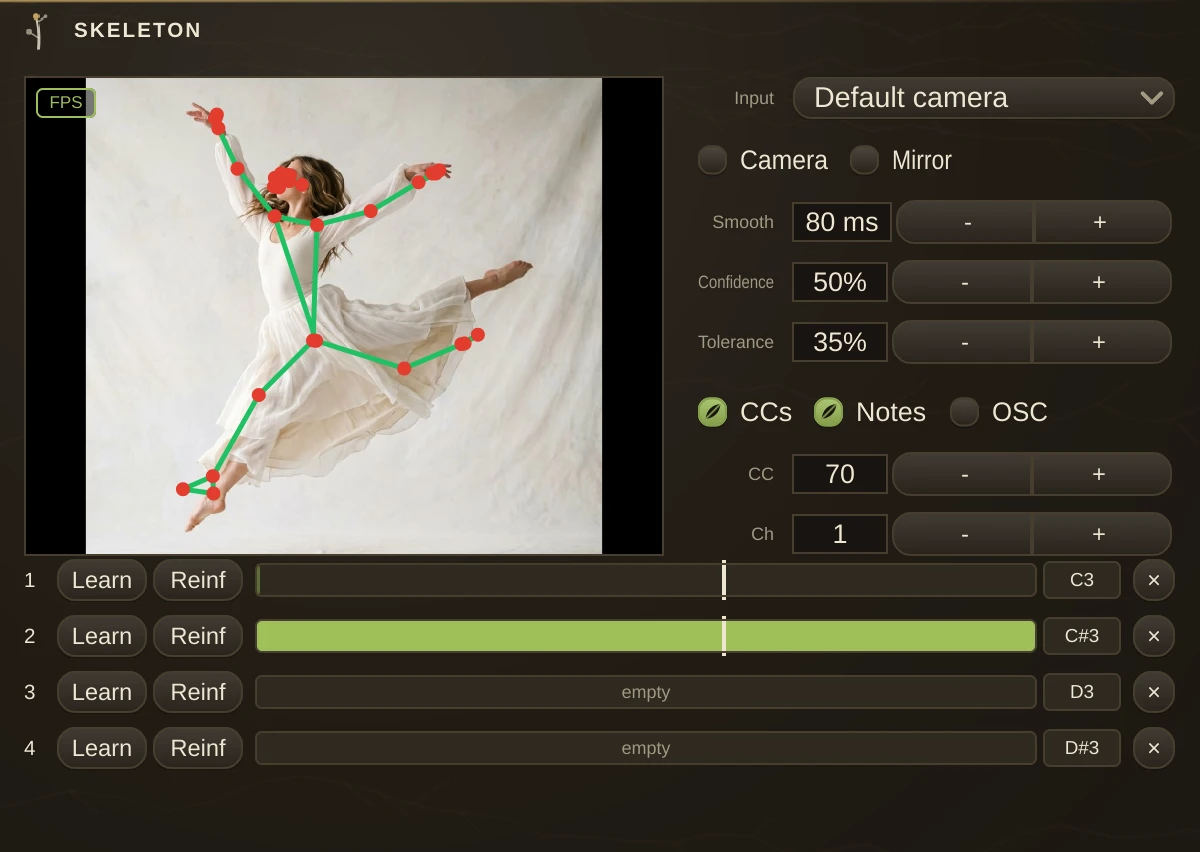
Whole-body tracking as a control source: step in front of the webcam and your posture becomes a patchable signal - head, hands, arms, lean, crouch, stance. Video never leaves the process, and the camera opens only while Enabled is on, with the system asking permission on first use. The preview draws the live skeleton over the picture.
Skeleton is a MIDI controller - one MIDI outlet, no audio. Cord it into a plugin, a synth organism or a MidiOut for hardware; to drive native parameters, map its CCs in Parameter Control like any controller. It tracks one performer, framed roughly from the knees or feet up; readings that need joints the camera cannot see simply hold their last value instead of jumping.
What it sends
Twelve values ride CC base +0 to +11, each smoothed 0..1 before being scaled to 0..127. L and R are your own left and right, wherever you stand and whichever way Mirror flips the picture.
| +0, +1 | Head X and Y - where your head is in the frame, Y up. |
| +2 to +5 | Left hand X/Y, right hand X/Y - the wrists in the frame. The broadest gestural controllers here: a hand sweeping across the frame is a fader the size of the room. |
| +6, +7 | Raise L and R - how high each arm is, 0 hanging at the hip, 0.5 at shoulder height, 1 overhead. Distance-invariant, so stepping closer does not raise your arms. |
| +8 | Lean - shoulders slid sideways over the hips, 0.5 upright. |
| +9 | Crouch - 0 standing tall, rising as you drop. |
| +10 | Stance - feet together to feet wide. |
| +11 | Present - 1 while someone is seen, falling when the frame empties. |
Each learned pose sends its own note, with velocity set by match strength, exactly as Hands does with hand gestures: the marker on the match bar is the fire threshold, release sits just under it, and the best-matching pose suppresses the rest.
Learning poses
Four slots. Press Learn and hold the pose - arms crossed, a T, one fist raised - for about a second and a half; the average shape becomes the template and is stored in the patch. Press Reinf and strike the same pose again from another spot or angle, and each reinforcement folds into the template as a running average. A pose is its arm geometry - raise, spread, elbow bend, lean, crouch - not a position in the frame, so it fires wherever you stand.
Parameters
| Enabled | opens the camera. Nothing is captured while this is off. |
| Input | picks the camera. **Mirror** flips the picture so moving right moves the reading right. |
| Confidence | is the tracker's admission bar: raise it if furniture or a poster keeps being mistaken for a person, lower it in bad light. |
| Smooth | settles the readings; higher is calmer and slower. **Tolerance** is how loosely a live pose may fit a template and still match. |
Every signal is also a control source: right-click any knob - or a transport button - and Skeleton appears under Control with, head, hands, raises, lean, crouch and the four pose matches alike, no MIDI cords needed. **CCs / Notes / OSC** choose what leaves the outlet, **CC** sets the base number and **Ch** the channel. With OSC on, every value is also published under the organism's OSC name - head, hands, raise, lean, crouch, stance, present and the four pose matches.
Video in
The video inlet takes a cord from any video contraption - CameraIn, VideoPlayer, a VideoMix blend - and the tracker reads that picture instead of opening its own camera. A patched cord always feeds; Enabled only governs the built-in camera, which stays closed for as long as a cord is patched. Track a dancer from a video file and the performance replays exactly; put several trackers on one CameraIn and they share the picture instead of fighting over the device. Mirror still applies to whatever arrives, so if the source contraption mirrors too, the two flips cancel - turn one off.
Notes
Tracking runs on our own built-in model on every platform, and one performer is followed at a time; whoever the detector finds first holds the track until they leave the frame. It reads best framed like a fitness video - camera at chest height, whole body or knees-up in view - and dim light or heavy occlusion loosens it. The heavy lifting happens on a background thread, so audio never waits on the camera.