

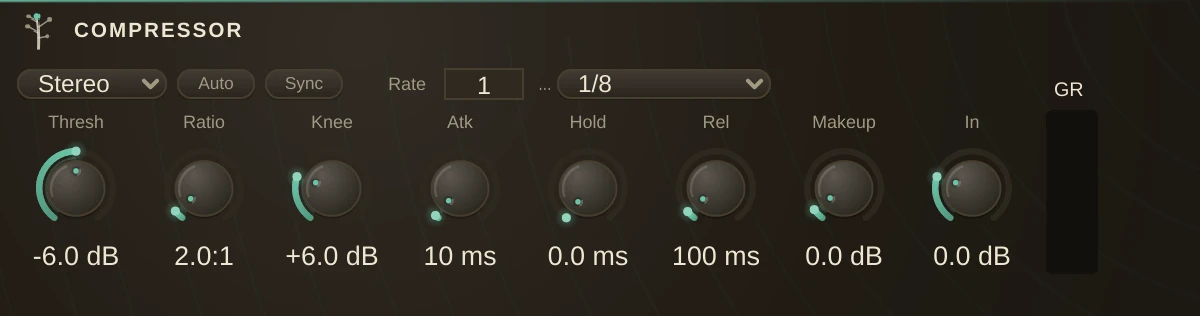
The leveller. A compressor listens to how loud a sound is and turns it down when it gets loud, which sounds like nothing at all until you notice that the quiet parts came up to meet the loud ones. Nothing was made louder; the distance between loudest and quietest simply got shorter, and everything that was hiding underneath is suddenly audible. It is the difference between a performance you have to ride by hand and one that holds its own level.
Setting up
Threshold first: lower it until the loudest moments are clearly being caught and the quiet ones left alone. Then Ratio, for how firmly they are held. Then Attack and Release, which are what make it sound like a decision rather than a process. Makeup last, to give back what the reduction took.
On a part with a pulse, turn Sync on instead of setting Release by ear: the recovery is then timed to a division, so the breathing lands with the music and stays there when the tempo changes.
Parameters
| Mode | switches stereo and mono in place, keeping the name, the settings and the automation. Detection is linked across channels either way: one gain is worked out and applied to both sides, so a loud moment on the left cannot pull the stereo image over to the right. |
| Threshold | the level where the compressor starts working. Above it the sound is held down, below it nothing happens. |
| CompressionRatio | how firmly. 2 means a sound going 2 dB over the threshold ends up only 1 dB over. Low ratios level, high ratios flatten. |
| KneeWidth | how gradually the ratio arrives, in dB either side of the threshold. A wide knee starts working before the sound technically crosses, so the compressor eases in instead of switching on. This is most of what people mean by a compressor sounding gentle or aggressive. |
| AttackTime | how quickly it responds once the threshold is crossed. Fast catches the initial hit; slow lets the hit through and levels only what follows, which is how a drum keeps sounding like it was struck. |
| HoldTime | how long full reduction is maintained before release begins. Useful on material that dips briefly, so the compressor does not let go and grab again. |
| ReleaseTime | how quickly it stops once the sound falls back below the threshold. Too fast and quiet passages breathe audibly; too slow and one loud moment holds the whole part down after it has gone. |
| Sync | times the recovery to the transport instead of the ReleaseTime knob, so the compressor lets go on a division of the beat. Attack is deliberately left where you put it: how fast it grabs belongs to the sound in front of it, and has no tempo. |
| SyncUnit | the division the recovery is timed to. At 120 an eighth is 250 ms; at 90 the same eighth is 333 ms, and the compressor follows without being touched. |
| SyncMultiplier | how many of that division, for a longer recovery that still keeps the feel of the unit you chose. |
| MakeupGain | gain added after the reduction, to bring the levelled sound back up to where it started. |
| AutoMakeupGain | works that gain out from the threshold and ratio, so changing either does not also change how loud the organism is. On while dialling in, off when you want the level to stay where you left it. |
| InputGain | trims the incoming sound before any of the above. Raising it drives more of the sound over the threshold without moving the threshold. |
How it works
The detector is feed-forward: it measures the input, decides on a gain, and applies it. The whole calculation happens in decibels, which is why the knee can be specified as a width rather than a curve shape, and why the ratio behaves the same at every level.
There is no key input here. To compress one sound with a different sound, use SideChain.