

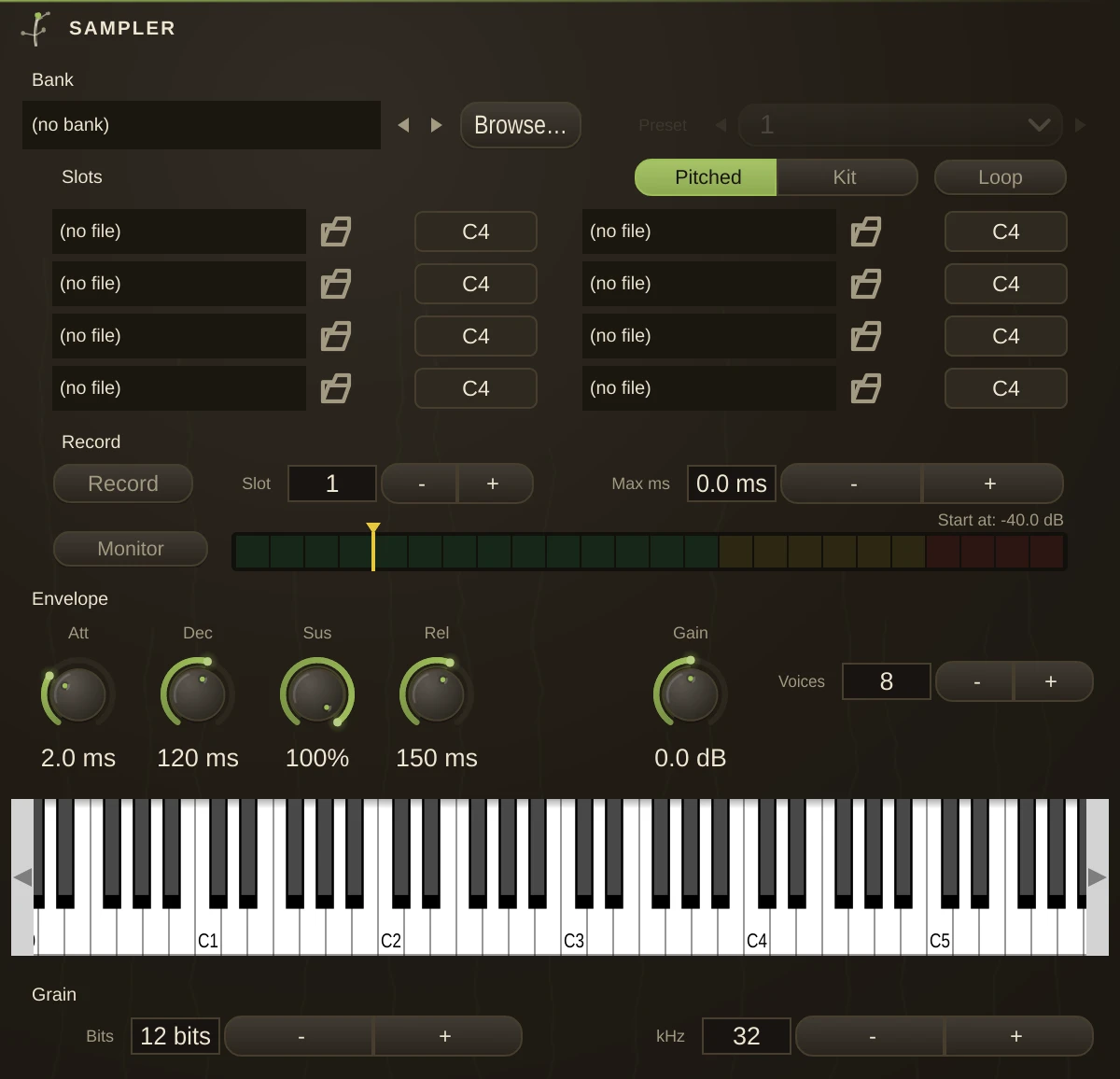
Polyphonic zone-mapped sample playback. Load up to 8 sound files (zones), give each a root note, and play them over MIDI - or load a whole .sf2 sample bank and play its instruments, or record straight off the patch and play that.
Mapping modes
| Pitched | Zones split the keyboard at the midpoints between their root notes (classic multisampling). Notes are pitched by resampling relative to the nearest zone's root. With a single loaded zone it spans the whole keyboard. |
| Kit | Each zone triggers only on exactly its root key, at native rate - map one-shots to individual keys for a drum kit. |
Playing it
The on-screen keyboard at the bottom of the editor (the computer-keyboard QWERTY piano works while it is open: A/W/S... play, Z/X shift octave).
A hardware MIDI keyboard (Enable MIDI): the Sampler listens omni.
MIDI patch cords: wire a MidiIn, PianoRoll, or a plugin's MIDI out into the Sampler's dotted MIDI inlet to sequence it.
Sample banks
Bank loads an .sf2 file: one file holding many instruments, each with its own key and velocity splits, tunings, loop points and envelope. Preset picks which instrument answers, listed by name. A loaded bank is the instrument - it brings all of that with it, and the eight slots are what plays when no bank is loaded. Load one and the slots fade: they are still there, still editable, and simply not what you are hearing. Banks live in your Humus folder under banks/, and a patch stores one by name rather than by path, so it finds the same bank on another machine. Browse reaches anything on disk.
Recording
Wire a signal into the Sampler's audio inlet, point To slot at a zone and press Record. What comes in is captured; press it again to stop, or set Max ms to stop by itself. The take is written as a sound file and dropped into that zone, so it saves with the patch, survives a reload, and can be replaced by hand like any other sample. Takes land in a samples folder beside the project's own recordings, under Documents, so they are somewhere you can find and drag from rather than buried in application data. A take is capped at thirty seconds however it is stopped - that is the size of headroom standing ready, so arming costs nothing. Max ms at 0 means that ceiling rather than no limit at all. The meter beside the row is the inlet, and it reads whether or not anything is armed - so a cord you forgot to patch looks different from a recorder that is not working. Monitor passes the inlet through to the outputs so you can hear what you are about to take; it is off by default, because a Sampler already wired into a mixer would otherwise double the signal. Start at holds an armed take until the input reaches that level, then begins. It starts just above silence by default, so a take opens on the sound rather than on the room - drag it to the far left for "any sound" if an armed take is waiting for a signal that never gets loud enough. It is the mark drawn over the meter: drag it to where the sound actually arrives, and the take opens there rather than with however long it took you to get back to the instrument. Dragged to the far left it reads "any sound", which records the moment you arm. Recording does not depend on a bank. A take always lands in a slot, and the slots play when no bank is loaded - so load a bank, sample something over it, and clear the bank to hear what you took.
Grain
The Sampler opens coarse, not clean: twelve bits at 32 kHz, which is where a late-eighties rack sampler lived. That is the instrument's voice rather than a fault to correct - set Pristine on the preset rail for an untouched file. The rail walks that history, oldest to newest: Ancient, Antique, Vintage, Classic, Modern, Pristine. Classic is what the box boots as. Each one moves Bits and kHz and nothing else, so recalling one never disturbs an envelope you set. Bits and kHz store the sample coarsely, the way hardware samplers did: fewer bits and fewer of them per second, baked into the sample rather than filtered over the top. The decimation is deliberately unfiltered - the aliasing is the point. 24 bits and 48 kHz leave the file alone. Moving either reads the file again, so the setting never piles up on itself.
Envelope & voices
Attack / Decay / Sustain / Release shape every note; velocity scales level. Polyphony caps simultaneous voices (the oldest voice is stolen beyond it). Loop repeats while a key is held (pads, textures). A file that carries its own loop points uses them; one that does not loops end to end. With a bank loaded the zone's own envelope is the sound and these controls scale it: half the knob is half that zone's time, double is double, and at their defaults a bank plays exactly as its author wrote it. Scaling rather than adding is what makes one knob work across a bank whose zones differ - a fixed number of milliseconds is nothing on a long release and everything on a short one.
Notes
Roots default to C4, note 60. A sampled instrument that records the key it was played at sets its own root on load, so you rarely have to. For kits, set each zone's root to the key you want it on - 36, 38, 42 and so on for a standard drum layout. Sample rate is respected per file; stereo files play stereo and mono files play centred.