

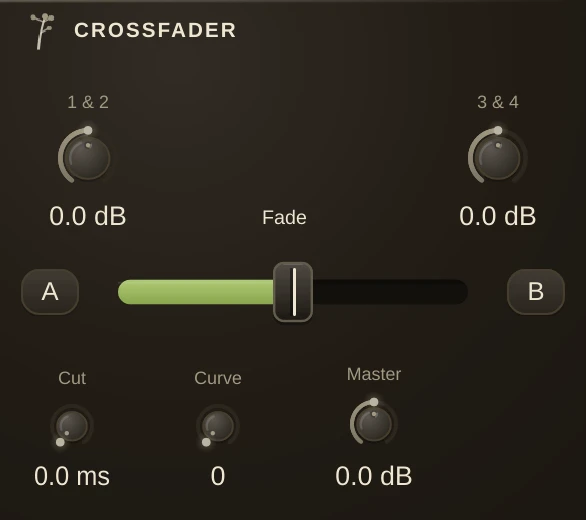
Two sources, one hand. A crossfader trades one stereo signal for another across a single control: all the way down is A on inlets 1-2, all the way up is B on inlets 3-4, and everywhere between is some of each. It is the oldest performance control there is, and it still matters because one gesture replaces two, so you can do it in time with the music instead of co- ordinating both hands. Automate the Fade and it becomes an arrangement.
The fade law
Two sounds crossing over do not add up the way you expect. Two unrelated signals at half level do not make one signal at full level, they make one at about seven tenths, so a straight-line fade dips in the middle. Two closely related signals, like a dry sound and a processed copy of it, do add up, so for those the straight line is correct and a curve would bump instead. There is no single right answer, which is why Curve is a knob rather than a decision made for you.
| Curve at 0 | the straight line. Correct for related material, and the default, so patches predating this control are unchanged. |
| Curve halfway | constant power: the two sides sum to a steady loudness across the whole travel. The one for unrelated sources, and the one a club mixer gives you. |
| Curve at 1 | a fast cut. Both sides stay near full through most of the middle and drop away only at the very ends, so a small movement near either edge swaps the sound outright. The scratch setting. |
The cut buttons
A and B, one at each end of the fader, are transform buttons. Hold A and the mix slams to the A side no matter where the fader sits; hold B and it slams to B; let go and it snaps back to the fader. Hold both and both sides open. They are made for the short cut, the stab and the scratch: leave the fader parked on the beat and chop the other source in with a finger, or map them to two pads and play the mixer like a drum. Cut sets how fast the slam lands, in milliseconds - zero is instant, a few milliseconds takes the click out of a bass drone.
The fader as a control Fade can also move other knobs, so one hand does more than trade the two signals. Right-click the parameter you want it to reach - a filter's cutoff, a delay's feedback, anything with a number - choose Follow, then Pick a control, and click the fader. Now the sweep opens the filter as it crosses. Any parameter in the patch works this way, in either direction; the range and the response curve are set in Parameter Control, and the driven knob wears the ring that says something else is holding it.
Parameters
| Fade | the crossfade itself. Down is A, up is B. |
| Curve | the fade law, as above. |
| TrimA | levels the A input before the fade, so the two sources can be matched to each other first. |
| TrimB | the same for B. |
| MasterGain | the output level, after everything. |
| CutA / CutB | the transform buttons. Held, the mix jumps to that side; released, it returns to Fade. Both held opens both sides. |
| CutTime | how long a cut takes to land, in milliseconds. Zero snaps. |
Notes
Match with the trims before you touch the curve. A crossfade that seems to lurch is usually two sources at different levels rather than the wrong law, and no curve setting will fix that.