

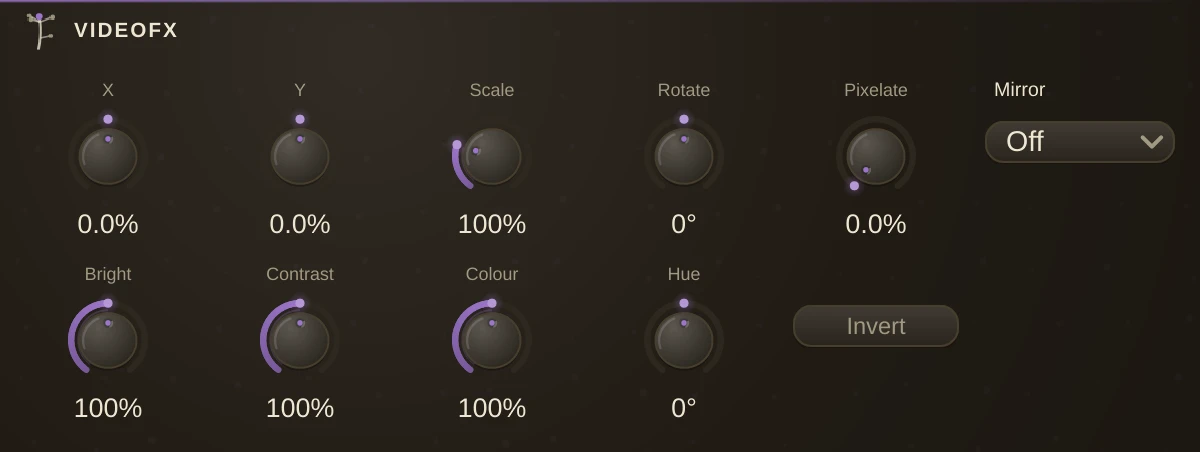
The picture treatment. One video inlet, one outlet, and a rack of knobs that move, resize, spin, colour and break the frame on its way through: position, scale and rotation on the top row, brightness, contrast, colour, hue and invert on the bottom, a pixelate knob that coarsens the image down to a mosaic and a mirror that folds the frame across its middle.
Every knob is an ordinary param, and that is the point: put a Follower on Scale so the kick pushes the picture at you, an LFO on Rotate for a slow spin, a Sequence on Hue for a colour cycle in time, or map the lot to a controller. Chain two for a transform and a colour stage that automate separately, or put one before a VideoMix and one after.
Parameters
| PosX / PosY | where the picture sits, as a share of the frame: +100% slides it a whole frame to the right or up, -50% half a frame the other way. |
| Scale | how big. 100% is as it came, 200% twice as big, 0% collapses it to a point. |
| Rotate | the spin, in degrees, around the centre of the frame. |
| Pixelate | how coarse the mosaic is. 0% leaves the picture alone; 100% is a handful of blocks across. |
| Mirror | folds the frame: Left copies the left half onto the right, Top the top half onto the bottom, Both does both. |
| Brightness | the light. 100% is as it came, 0% is black, 200% twice as bright. |
| Contrast | the spread around mid-grey. 0% flattens to grey, 200% pushes to the extremes. |
| Saturation | the Colour knob: 0% is monochrome, 100% as it came, 200% overdriven. |
| Hue | rotates every colour around the wheel, in degrees. |
| Invert | the negative. |