

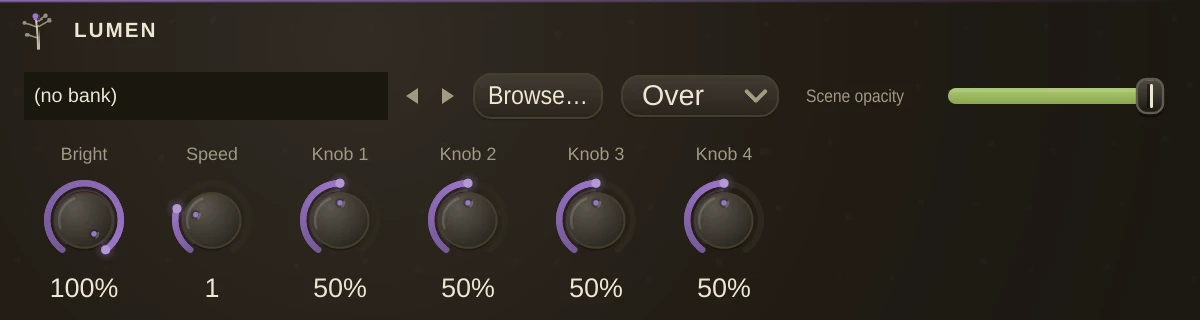
The visual compositor: it listens to whatever audio you patch into its two inlets and paints it. To see it, cord its video outlet into a VideoOut and open that from Control > Video Outputs - the same way a synth needs a SoundOut to be heard. The VideoOut's Screen param owns the projector.
Scene takes a GLSL fragment shader (.frag) or an ISF file (.fs) and hot-reloads it whenever the file changes on disk; leave it empty for the built-in scene. Shaders see the audio as hum_Level, hum_Bands, hum_Beat/hum_BPM/hum_OnBeat, plus hum_Wave and hum_Spectrum textures; an ISF file's own float inputs ride Knob1-4. Brightness, Speed and the Knobs are ordinary params - automatable and mod-routable, so a Follower or LFO can play the picture the same way it plays a filter.
Two more shader dialects load as they are. A live-visuals scene file (renderMain plus the syn_ audio vocabulary) gets the full mapping - levels, hits, beat values, the spectrum texture - including multipass scenes that feed buffers back on themselves; controls that lived in the scene's own project file arrive as uniforms reading zero. A sprite effect shader (.fsh, the v_tex_coord and u_texture vocabulary) runs with the video layers beneath as its input texture, so effect shaders become layer effects and generators simply draw; its u_ values ride the Knobs - strength on Knob1, speed and colour on Knob2, frequency, density and grids on Knob3, width and detail on Knob4, brightness on Brightness.
Video: the four video inlets take VideoPlayer decks (or any video-outlet organism) over video cords - the third cord domain, in its own colour. Layers stack bottom-to-top under the Scene, which floats over them via SceneOpacity/SceneBlend. Opacity, rate, blend and wear live on each deck: the player is the clip's channel strip.
Parameters
| Scene | the shader to run: .frag, .fs, .glsl or .fsh. Empty runs the built-in scene, and edits to the file reload while it plays. |
| Brightness | the overall output level of the scene. |
| Speed | how fast the scene's own time runs. 0 freezes it. |
| Knob1 | a value the scene reads for itself. What it does depends on the shader. |
| Knob2 | the second such value. |
| Knob3 | the third. |
| Knob4 | the fourth. |
| SceneOpacity | how strongly the scene shows over the video layers beneath it. |
| SceneBlend | whether the scene sits Over the video layers or Adds to them. |