

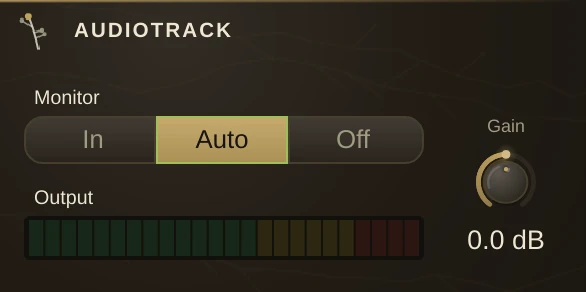
The recording sequencer's audio channel. It gets a row on the Timeline, plays that row's audio clips sample-accurately against the transport, and records takes of whatever is patched into it.
Unlike most players it sits inline in the signal path - stereo in, stereo out - so it goes where you would put a recorder: downstream of the source you want to capture. What comes out is its clips, its input, or both, depending on Monitor.
Parameters
| Record | arms the track. The transport's record drives this, so it is normally armed from the transport rather than by hand. |
| Monitor | what reaches the outlets: |
| Gain | level of the track's output. |
| Mute | silences the track's output. |
Monitor
| In | input plus clips - always hear what is patched in. |
| Auto | input while armed or stopped, clips while playing un-armed. The default, and what you want nearly always: you hear yourself when you are about to play, and the tape when it is rolling. |
| Off | clips only - the input is never monitored. |
Usage
Patch the source you want to capture through the track, leave Monitor on Auto, arm it from the transport and play. Takes land as clips on the track's timeline row, where they can be moved and trimmed like any other clip. A sound file dropped on the timeline lands here too - if no audio row is under the cursor, one is made and cabled to the master so the drop is audible straight away.
Clips carry what the material runs at, detected on import and printed on the clip face where it can be corrected. Drag a clip's top corners for fades, and its bottom-right corner to lay the same material out lap after lap.
Takes
Record a second lap over the same bars and the new clip lands on top of the old one. A lane plays one clip at a time, so what you hear is the top of the pile. Unfold the row and each take gets a lane showing the whole take with the parts you are hearing filled in; click one to bring it to the top. Nothing is deleted on the way.
Consolidate
Right-click any track row for Consolidate, which renders what that row makes over the selected bars into an audio clip on a new track, and mutes the row it came from - the row's own M box, so you can hear it again with a click. The new track is cabled exactly where the sound it replaces was going, so whatever was downstream - a filter, a gain stage, a mixer strip - still applies. On a note row it renders the instrument the row's cords reach, not the notes, which is why an instrument two note rows share keeps playing for the other one. Freeze, bounce and commit in one move, and one undo takes all of it back.
Notes
Clips load without interrupting playback, however heavy the arrangement. Because the track is inline, muting it also mutes whatever is patched through it - it is not a send.
Media Info
Right-click a clip and choose Media Info for the clip's position and length in beats and seconds, its in and out points, warp and source tempo, the file's path, size and date, and the sound file's format, sample rate, channels, bit depth and length. Copy puts the text on the clipboard for a bug report; Show File opens the folder it lives in.