

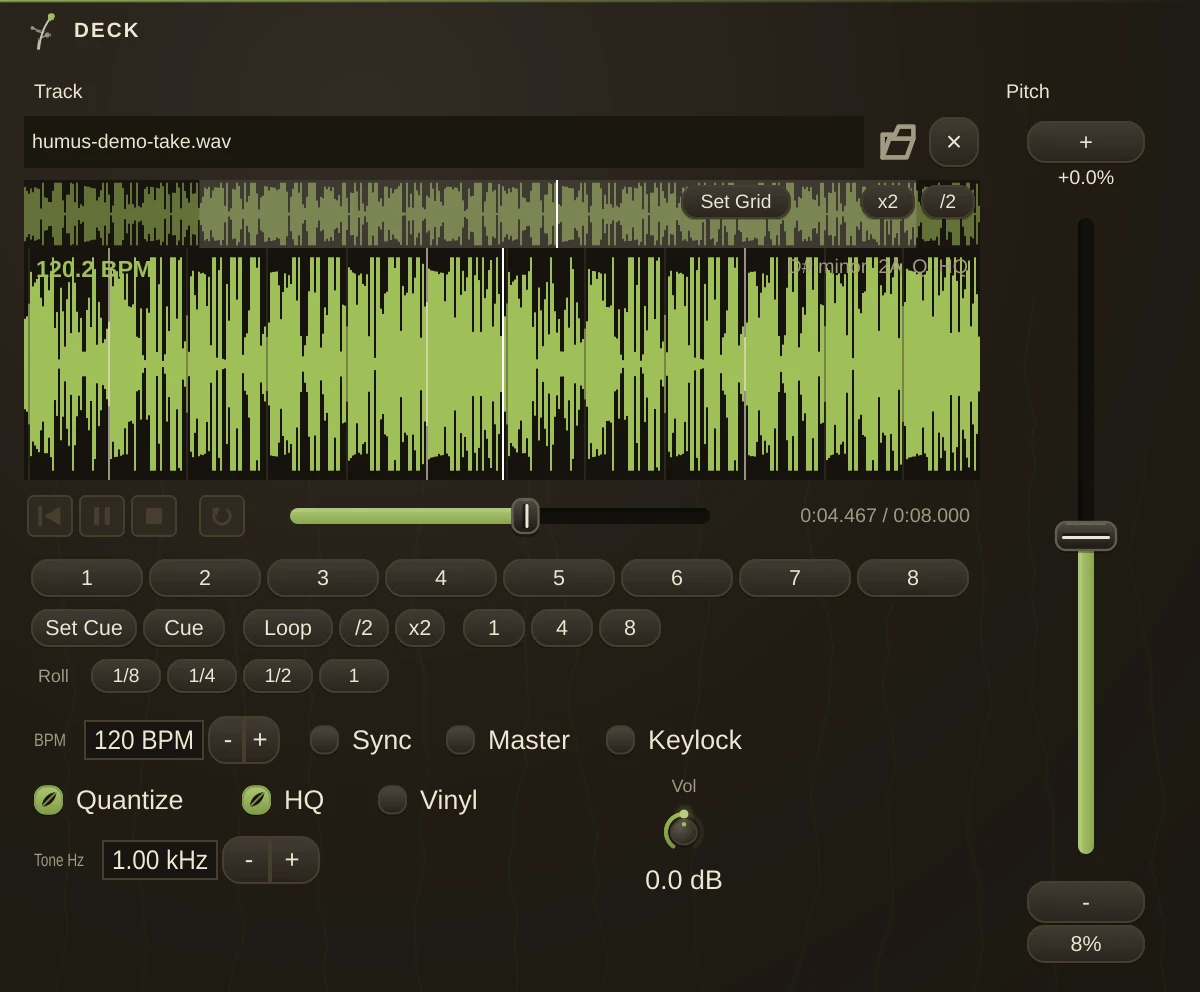
A DJ deck in the modern DJ-software tradition. It plays a sound file at a variable rate from a pitch fader, carries a beatgrid, and can lock to another deck. Stereo out; the stereo inlets carry a control record's tone when Timecode is on and are ignored otherwise.
Two decks, one flagged Master and one flagged Sync, is the whole classic setup: the Master drives the patch's tempo and the follower rides along, so everything else in the patch - sequencers, LFOs, delays - is already in time with the record.
Transport
| Active | play / stop. |
| Loop | loop between the loop points. |
| Cue | the cue point, in samples. |
| Volume | deck output level. |
Sync and tempo
| BPM | the track's tempo, the beatgrid's rate. |
| GridOffset | where the grid's downbeat sits, in samples. BPM sets the spacing of the beats; this sets where they start. Both must be right or nothing will stay locked. |
| Master | this deck drives the whole patch's tempo. Only one should be master at a time. |
| Sync | follow the master deck's rate and approximate phase. |
| PitchPercent | the pitch fader, as a percentage. |
| PitchRange | how far the fader travels, from +/-8 % (the classic turntable range) up to +/-50 % for extreme effects. |
Pitch modes
By default the deck resamples, so pitch and tempo move together exactly as they do on a turntable - speed it up and it goes sharp. Keylock changes the tempo while holding the pitch, for beatmatching without the key drifting. Keylock needs a build with time-stretching available and quietly falls back to resampling when it is not there.
Cues and loops
| HotCue_1 | eight hot cues. A cue button stores the playhead the first time it is pressed and jumps there afterwards; -1 means unset. |
| LoopIn | loop start, in samples. |
| LoopOut | loop end, in samples. |
| LoopBeats | beat-loop length, from a quarter beat to 32 beats. |
| Quantize | snaps cues and loops to the nearest grid beat, the "snap" behaviour DJs expect. On by default, and worth leaving on - an unquantised hot cue is how a mix falls apart. |
Timecode vinyl
A control record presses a steady tone whose two channels sit a quarter turn apart, so the stylus speed and direction can be read straight off the phase. Wire the turntable through a Phono organism (the tone is cut at phono level) into the deck's inlets and switch Timecode on: the record now drives the platter - beatmatching by hand, scratching, backspins, and lifting the needle stops the motor. This is relative control (speed and direction, not absolute needle position), it works with any control record, and it sidesteps Sync and Keylock while on - the hand outranks the automatics.
| Timecode | the stereo inlets drive the platter. |
| TimecodeHz | the record's tone frequency at normal speed. Most press around 1000 Hz; check the sleeve. |
Quality
| HQ | higher-quality resampling (sinc rather than cubic). On by default; turn it off to save CPU on a crowded patch. |
| Keylock | hold pitch while changing tempo (see Pitch Modes). |
Usage
Load a track, set BPM and GridOffset so the grid actually lands on the beats, then flag one deck Master and Sync the other. Get the grid right first: every other feature here, including Quantize and Sync, is built on top of it, so a wrong grid makes all of them look broken.
Notes
Because a Master deck drives the global transport, its pitch fader moves the tempo of everything in the patch that follows the clock - that is the point, but it will surprise you the first time a sequencer speeds up with the record.