

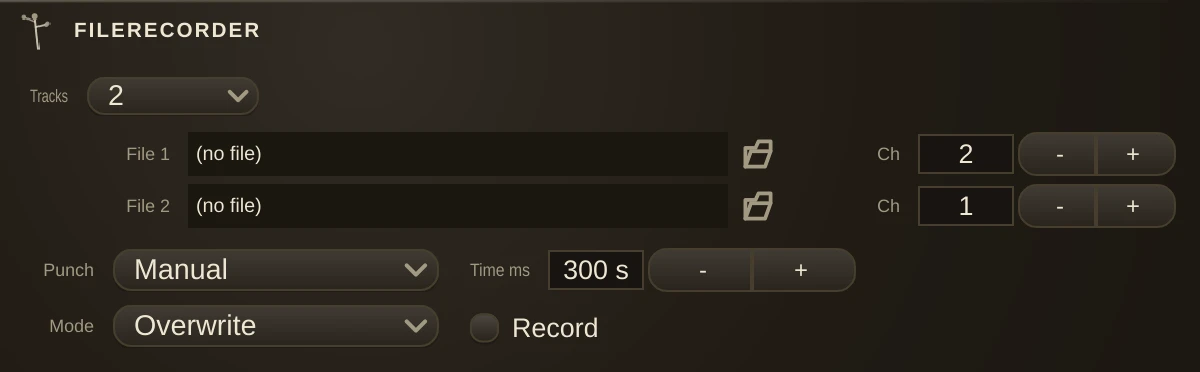
The tap that writes. Put it anywhere in a patch and whatever passes through lands on disk while the sound carries on to wherever it was going. It passes its input straight through, so it can be dropped into a cord rather than onto the end of one, and the patch keeps working exactly as it did. Recording a stem mid-chain is often more useful than recording the master, because a stem can still be changed afterwards.
Tracks
One recorder, any width. The Tracks combo sets how many channels come in, from 1 to 32, and the editor grows a file row for each. Changing it keeps the name, the settings and the automation, and clamps any cords left without an inlet to land on. The wide sizes exist so several files can be captured at once: they arm together, stop together, and line up when you open them somewhere else. Stems captured in separate passes drift; these do not.
Channel splitting
The channels are handed to the files in order, and each file's Ch spinner says how many it takes. File 1 starts at the first inlet, file 2 continues where file 1 stopped, and so on. The counts need not match, so a 16-track recorder can write one stereo file and fourteen mono ones, or four groups of four, or anything else that adds up.
A new recorder gives file 1 every channel, so out of the box you get one file the full width of the organism. To split it, pull file 1's count down first and the later files will have channels to claim. A file reaching past the last inlet records silence rather than failing - so if a stem comes back empty, check the counts above it.
Parameters
| Tracks | how many channels the recorder takes, 1 to 32. Not a stored parameter: it re-classes the organism, which is why it survives saving. |
| Record | arms and disarms every file at once. |
| File_1, File_2,... | where each file goes. One per row. |
| RequestedChannelCounts_1 | how many channels file 1 takes, and so on down the rows. |
| FileMode | Overwrite replaces whatever is there. Append loads the existing file and records after the end of it, so a session can be built up over several passes. |
| PunchMode | Manual stops on the button. Timed stops itself after RecordDuration and finalises the file. |
| RecordDuration | how long a Timed pass runs. |
Notes
Files are written clear of the audio path; nothing touches the disk from inside the audio path, because a disk that pauses to think - and they all do - would take the patch's audio down with it. That is also why a recording must be stopped rather than abandoned: finalising is what writes the header that makes the file readable.
There is a second way to record, and for a lot of work it is the better one: the transport's Record button captures armed AudioTrack organisms straight onto the timeline, where you can see and move what you caught. Use this organism when you want plain files on disk instead.